
At 01:59:20, AWS Backup marked the restore job COMPLETED. The recovery had already missed its target. Nobody knew it yet.
This was a modeled weekly exercise, not a customer incident. The workload had a 60-minute recovery time objective. AWS Backup waited 11 minutes 42 seconds before starting the job, then spent 47 minutes 38 seconds creating a new RDS instance. The database validator needed another 6 minutes 9 seconds. Reconnecting the application, warming it, and passing the service health check took 14 minutes 31 seconds.
start wait:           11m 42s
resource restore:     47m 38s
validation:            6m 09s
application cutover:  14m 31s
---------------------------------
workload recovery:    80m 00s
RTO miss:             20m 00s
The AWS restore job finished inside 60 minutes. The workload did not.
That difference is the reason I don't like the word protected in a report that has never restored anything. A successful backup proves that a recovery point exists. A successful AWS Backup restore test proves that AWS could create a resource from it. The application still has to read the data, accept traffic, and do so before its clock expires.
My first version of this recovery checklist treated COMPLETED as the result. It was tidy and wrong. A healthy-looking resource can still be unusable: a database in the wrong subnets, a security group with no path from the test runner, or a volume that mounted but contained data older than the stated RPO. COMPLETED is now the midpoint of the test.
AWS Backup Restore Testing schedules real restore jobs using the same recovery points and StartRestoreJob path as an on-demand restore. That makes it much more useful than a report saying that yesterday's backup job succeeded. It also gives the test a precise boundary: AWS is restoring a resource, not your entire service.
There are four different claims hiding in a green recovery report:
- A recovery point exists.
- AWS can create a resource from it.
- The restored resource contains usable, sufficiently fresh data.
- The workload can return to service within its RTO.
Restore Testing directly proves the second claim. Your validator has to prove the third. Your end-to-end timer and cutover procedure have to prove the fourth.
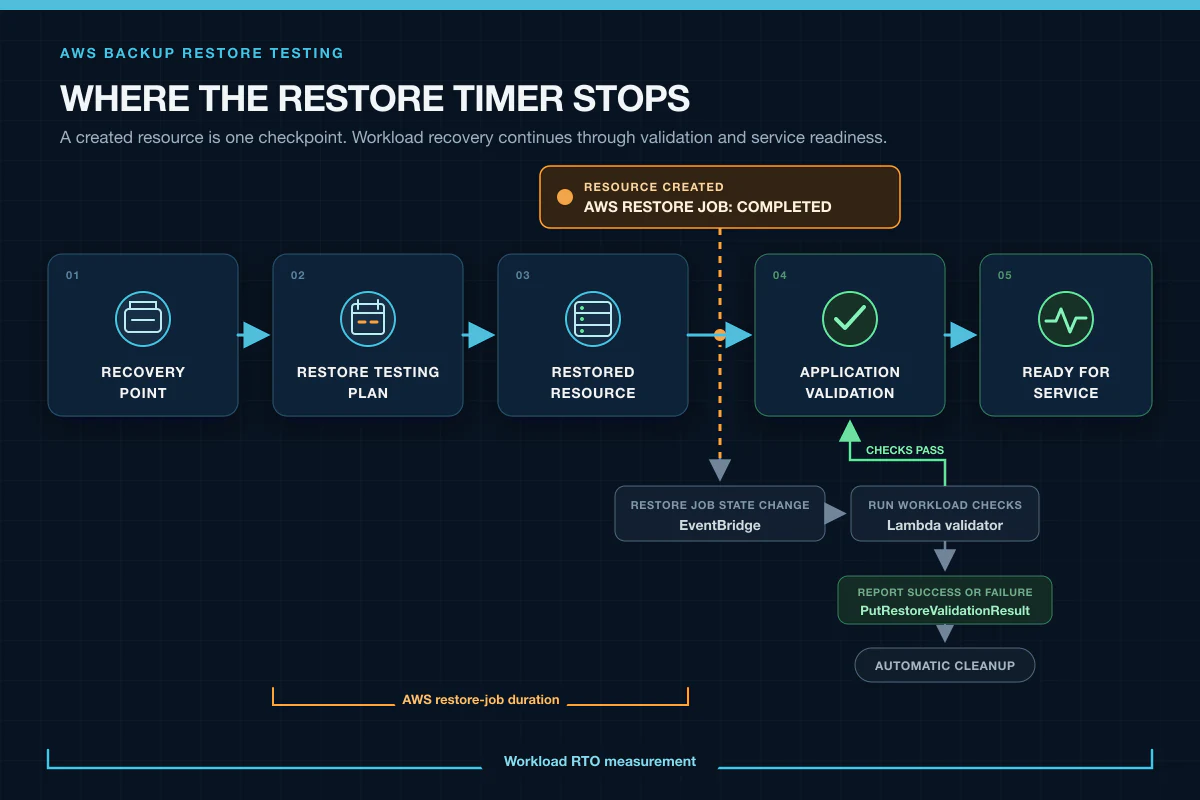
The restore job can be complete while workload recovery is still running.
AWS makes no restore-time SLA, and a restore from cold storage typically adds four hours before the resource-specific work begins (restore guidance). If the business promises a one-hour RTO, the promise cannot be derived from a backup policy. It has to come from observed recovery tests using the same storage tier and roughly the same data size.
Even AWS Backup Audit Manager's control named “Restore time for resources meet target” compares LatestRestoreExecutionTimeMinutes with maxRestoreTime. That is useful evidence, but it is still the resource timer, not the workload timer (control reference).
Start with one resource whose failure would make a familiar application stop. RDS is a good first test because it forces you to confront networking, credentials, data freshness, and application behavior. EBS or EFS is simpler if the team is new to recovery drills.
In the AWS Backup console, open Restore testing plans, choose Create restore testing plan, and set:
- a weekly schedule in an explicit timezone;
- a two-hour start window;
LATEST_WITHIN_WINDOW;- a seven-day selection window;
- the vaults that hold this workload's recovery points.
Then add a selection for one resource type. A plan can contain several selections, but each selection covers one resource type. Use an explicit resource ARN for the first run. Tag conditions become useful later, after you know the path works.
The equivalent CLI call is:
aws backup create-restore-testing-plan \
  --restore-testing-plan '{
    "RestoreTestingPlanName":"weekly_recovery_proof",
    "ScheduleExpression":"cron(0 3 ? * SUN *)",
    "ScheduleExpressionTimezone":"UTC",
    "StartWindowHours":2,
    "RecoveryPointSelection":{
      "Algorithm":"LATEST_WITHIN_WINDOW",
      "IncludeVaults":["*"],
      "RecoveryPointTypes":["SNAPSHOT","CONTINUOUS"],
      "SelectionWindowDays":7
    }
  }'
AWS can also choose RANDOM_WITHIN_WINDOW. I use latest for a weekly readiness test because it is the recovery point I would probably choose during an incident. I use random selection in a separate, less frequent plan to sample older points. Those are different questions; one algorithm shouldn't pretend to answer both.
Now create the RDS selection. The account ID, ARN, subnet group, security group, and role below are placeholders:
aws backup create-restore-testing-selection \
  --restore-testing-plan-name weekly_recovery_proof \
  --restore-testing-selection '{
    "RestoreTestingSelectionName":"orders_rds",
    "ProtectedResourceType":"RDS",
    "IamRoleArn":"arn:aws:iam::123456789012:role/AWSBackupRestoreTestingRole",
    "ProtectedResourceArns":[
      "arn:aws:rds:us-east-1:123456789012:db:orders-prod"
    ],
    "RestoreMetadataOverrides":{
      "dbSubnetGroupName":"restore-test-private",
      "vpcSecurityGroupIds":"[\"sg-0123456789abcdef0\"]"
    },
    "ValidationWindowHours":2
  }'
Notice that vpcSecurityGroupIds is a JSON-array-encoded string inside the JSON document. It is ugly, but it is the shape the restore metadata expects. Validate the command in a non-production account before turning the ARN into a wildcard.
The service-linked role for Restore Testing is created by AWS. The IamRoleArn in the selection is separate: it is the restore role AWS Backup assumes to create the resource. Give it only the restore and tagging permissions needed for the selected resource type, with backup.amazonaws.com as the trusted service.
Restore Testing supports Aurora, DocumentDB, DynamoDB, EBS, EC2, EFS, several FSx variants, Neptune, RDS, and S3. That list is broad, but it is not every resource AWS Backup can restore. AWS added six more Regions on July 16, 2026, including Asia Pacific (Taipei), Asia Pacific (Malaysia), and Canada West (Calgary), so check current regional availability rather than copying an old matrix (July 2026 announcement, supported resources).
Validation is optional in the AWS configuration. It is not optional if the result is meant to say anything about recovery.
AWS Backup sends a Restore Job State Change event to EventBridge when the restore reaches COMPLETED. The event includes the restore testing plan ARN, resource type, created resource ARN, and restore job ID. An EventBridge rule can narrow that stream to one plan and resource type:
{
  "source": ["aws.backup"],
  "detail-type": ["Restore Job State Change"],
  "detail": {
    "restoreTestingPlanArn": [
      "arn:aws:backup:us-east-1:123456789012:restore-testing-plan:weekly_recovery_proof"
    ],
    "resourceType": ["RDS"],
    "status": ["COMPLETED"]
  }
}
Send that event to a Lambda function or a Step Functions workflow inside the restore-test network. For a database, my minimum validator does four things:
- Waits for the database endpoint to accept a connection from the same network path the recovered application will use.
- Reads a known heartbeat or transaction timestamp and compares it with the declared RPO.
- Checks a small set of schema versions, table counts, or invariants that would catch a wrong or partial dataset.
- Starts a read-only application path and waits for its health check, rather than stopping at
SELECT 1.
The validator then calls PutRestoreValidationResult with SUCCESSFUL or FAILED for the restore job. The API also accepts VALIDATING and TIMED_OUT, which lets a longer workflow report an honest intermediate state (API reference).
If the validator only checks that the resource ARN exists, it has automated the least interesting line of the runbook. The created resource ARN came from an event that already said the restore job completed.
Keep the validator read-only at first. A later drill can test promotion, writes, or data reconciliation. The weekly test should be safe enough to run without a human waiting beside it.
Teams tend to time the restore and forget to date the data.
Suppose the plan looks back seven days and selects the latest eligible recovery point. The restore can finish in 35 minutes and still violate a 24-hour RPO if the backup policy stopped producing recovery points three days earlier. The validator should read an application-owned timestamp from inside the restored data. The creation time shown by AWS Backup is useful, but the workload knows whether replication lag, a failed export, or an application bug made the contents older than the backup label suggests.
Record at least four timestamps:
- scheduled test time;
- restore job start and completion;
- validation completion;
- ready-for-service completion.
From those, report two numbers: AWS restore-job duration and workload recovery duration. Then report data age separately. Combining them into a single green “recovery passed” field makes it impossible to see whether the time objective or the point objective failed.
AWS can infer restore metadata when you don't provide every override. For RDS, that may mean choosing the default VPC, its subnet group, and default security group. In an account with no default VPC—which is normal in a managed landing zone—the restore can fail before validation begins.
Preview the inferred values with get-restore-testing-inferred-metadata, then override the network settings explicitly (inferred metadata reference). I would rather see a verbose selection document than discover during an incident that the recovery plan depended on a default subnet nobody intended to keep.
AWS recommends using a designated account for restore tests. That is the right default. Restore into private subnets with no production routes, let the validator reach the resource through an intentional path, and block the restored workload from calling customers, payment providers, or production queues. “Non-production” is not enough if the recovered application still holds production credentials.
The isolated account also gives the restore role a smaller blast radius. The role needs permission to create the test resource; it does not need permission to modify the original one.
After validation finishes—or after the validation window closes—AWS Backup begins deleting the restored resource. Most supported resources receive the awsbackup-restore-test tag. Removing that tag can prevent automatic cleanup, so deny casual tag mutation and alert on it.
S3 and DynamoDB are notable exceptions: AWS uses the restored resource name rather than that tag for deletion. S3 cleanup can take days when a bucket contains many objects. Do not treat SUCCESSFUL validation as the final state of the scheduled job. Check the deletion status in AWS Backup → Jobs → Restore testing jobs and alert when it becomes FAILED or remains DELETING beyond your expected window.
This sounds like housekeeping until the second weekly test collides with the first restored database, the test account hits a quota, or a month of undeleted resources turns a reliability control into a small shadow environment.
This is not a cost-optimization argument, but teams still need a number to approve the test.
Using the US East (N. Virginia) rates in AWS's current pricing example, evaluation is $1.50 per tested recovery point. Imagine a monthly plan that evaluates seven points, including four 47 GB EFS recovery points:
7 tested recovery points × $1.50 = $10.50
4 EFS points × 47 GB = 188 GB restored
188 GB × $0.02 = $3.76
modeled AWS Backup charge = $14.26/month
Underlying resource runtime, API requests, data transfer, and cold-storage retrieval can add to that total. The exact bill depends on resource type and Region (AWS Backup pricing). The useful comparison is not “test versus free.” It is a measured monthly test versus discovering a broken restore role inside the recovery window.
An automated restore test is not a disaster-recovery game day. It will not prove that DNS cutover works, that the incident commander can assume the emergency role, that a cross-Region dependency is available, or that the restored service survives production load.
That objection is correct and beside the point.
Scheduled tests catch broken IAM roles, deleted subnet groups, unusable recovery points, stale data, application connection failures, and abandoned restored resources between game days. Game days test people, dependencies, traffic movement, and the whole runbook. One is frequent evidence; the other is a broader rehearsal.
There are also hard limits to what Restore Testing can claim. AWS provides no restore-time SLA. Not every restorable resource type is supported. Application validation is yours to build. A successful test in one Region does not prove a cross-Region recovery design. And a test on a 47 GB filesystem says little about the restore time of its 8 TB production sibling.
I would reserve protected for a workload that has recent evidence, not merely a backup rule:
| Reported state | Required evidence |
|---|---|
| Protected | Eligible recovery point within RPO, successful restore within the agreed cadence, application validation passed, workload RTO met, cleanup succeeded |
| Recovery failed | Restore, validation, RPO, RTO, or cleanup missed its threshold |
| Recovery unknown | No test inside the required cadence, unsupported resource, or incomplete measurement |
That wording is deliberately uncomfortable. “Recovery unknown” creates a conversation that a green backup count avoids.
For a first test, give yourself fifteen minutes to define the path before touching AWS:
- Choose one resource and write down its RTO and RPO.
- Name the application check that proves the data is usable.
- Choose an isolated account and explicit network overrides.
- Schedule
LATEST_WITHIN_WINDOWand set a validation window. - Wire
COMPLETEDthrough EventBridge to the validator. - Report the validation result to AWS Backup.
- Measure until the application is ready, not until the resource exists.
- Verify deletion and keep the last successful evidence date.
AWS Well-Architected says to perform periodic recovery to verify backup integrity and the recovery process (REL09-BP04). The important word is recovery. Backup creation is only the material you start with.
The day of the incident is a terrible time to discover what AWS meant by COMPLETED.