Move 41.7 TiB from application instances in one Availability Zone to network interfaces in another. At the common EC2 regional data-transfer rate, that one-way flow costs $854.02 per month.
Picture the Tuesday cost review: the application metric says 41.7 TiB, the Cost Explorer CSV says 85,401.6 GB, and the Slack thread begins with, “Which graph is lying?” Neither one is.
The physical payload is only 42,700.8 GB:
41.7 TiB × 1,024 = 42,700.8 GBBut AWS charges the source side for regional data transfer out and the destination side for regional data transfer in:
source side:      42,700.8 GB × $0.01 = $427.008
destination side: 42,700.8 GB × $0.01 = $427.008
total:                                      $854.016
Rounded to cents, that is $854.02. Return traffic is separate.
This is a modeled path, not a disguised customer invoice. The point is the unit mismatch: one GB of physical flow can produce two GB of chargeable usage. If you look only at the service total, it feels like AWS counted the bytes twice. In the usual EC2/ENI case, it did—once at each end, exactly as the pricing page says.
Cross-AZ spend is not automatically waste. It is a topology tax. Zero is a bad universal target; unexplained is the defect.
AWS lists a $0.01/GB charge in each direction for regional traffic between Availability Zones or using Elastic IP addresses or private IP addresses for EC2 instances. The same section covers common paths involving EC2, RDS, Redshift, DAX, ElastiCache, and elastic network interfaces. It also says same-AZ traffic for the listed services is free when private or Elastic IP addresses are used. The current wording is on the EC2 On-Demand pricing page.
That produces two billable observations of one crossing:
- the source sent 1 GB across an AZ boundary;
- the destination received 1 GB across an AZ boundary.
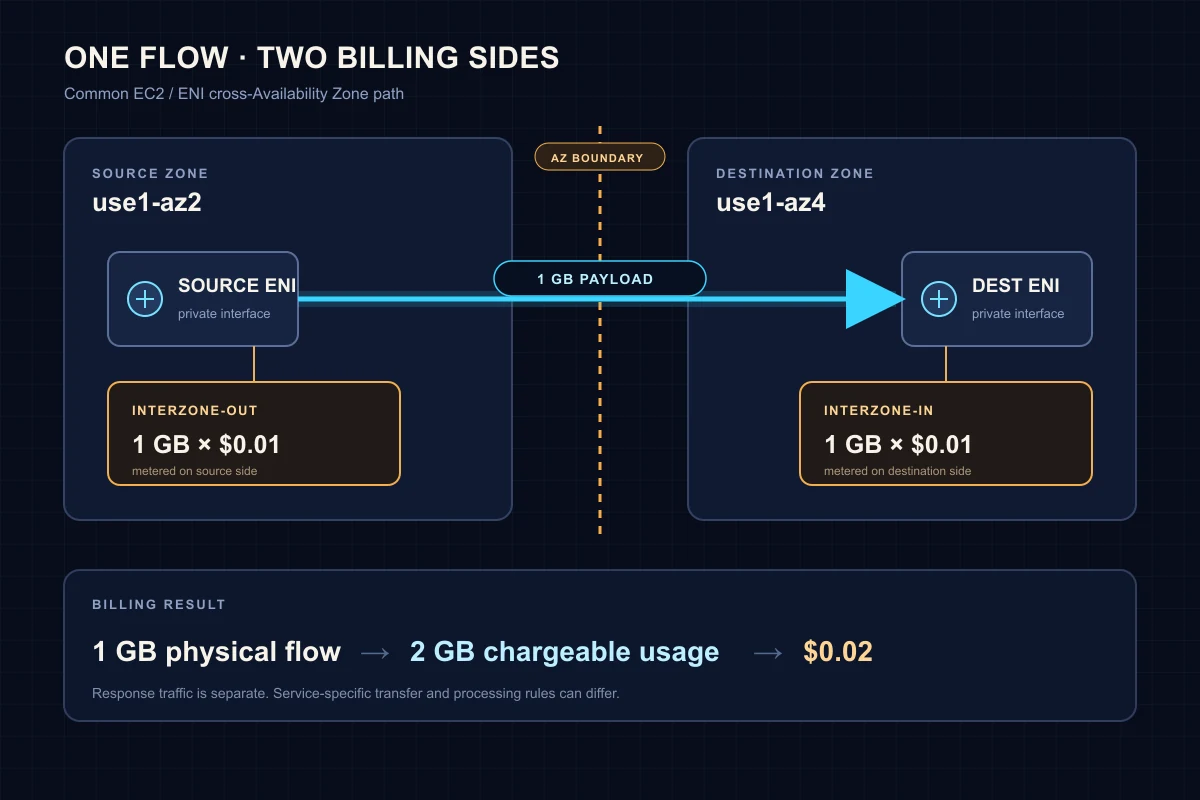
The diagram is deliberately narrow. It shows the common EC2/ENI case, not a universal AWS networking law. Transit Gateway, PrivateLink, Client VPN, VPC peering, managed service endpoints, and internet egress can have different transfer or processing treatment. AWS removed some inter-AZ transfer charges for PrivateLink, Transit Gateway, and Client VPN, while their processing charges can still apply.
There is another classification trap. AWS moved VPC peering charges from the Amazon EC2 billing product to Amazon VPC after April 2025. The traffic did not vanish; the product family changed. AWS explains the new records in its VPC peering charge guide. A Cost Explorer filter that includes only EC2 can now miss part of the story.
So do not multiply every regional byte in the account by $0.02 and call it an estimate. First identify the service path and the operations that created the line items.
I have changed my mind on this. I used to begin this investigation by summing VPC Flow Log bytes. That is backwards.
Flow Logs describe observed network flows. They are not the invoice, delivery is best effort, and the same conversation can appear on more than one interface. A careless query can manufacture its own “double charge” before AWS billing enters the picture.
Start in Cost Explorer:
- Open Billing and Cost Management, then Cost Explorer.
- Create a new cost and usage report for the last full month.
- Set granularity to Monthly and group by Usage type.
- Search the usage types for
DataTransfer-Regional-Bytes. - Switch to the table and sort by Unblended cost.
- Repeat with Service as the group so Amazon EC2 and Amazon VPC are both visible.
AWS documents the regional usage type as <Region>-DataTransfer-Regional-Bytes; for example, USE2-DataTransfer-Regional-Bytes. US East (N. Virginia) can appear without a prefix. The Data Exports documentation has the mapping.
Cost Explorer tells you whether the line is material. CUR or Data Exports is better for preserving the account, usage type, and operation in the same result. This Athena query works with the classic CUR column names; replace the table and dates:
SELECT
  line_item_usage_account_id AS account_id,
  line_item_product_code AS product_code,
  line_item_usage_type AS usage_type,
  line_item_operation AS operation,
  ROUND(SUM(line_item_usage_amount), 2) AS usage_gb,
  ROUND(SUM(line_item_unblended_cost), 2) AS cost_usd
FROM my_cur_table
WHERE line_item_usage_start_date >= TIMESTAMP '2026-06-01 00:00:00'
  AND line_item_usage_start_date <  TIMESTAMP '2026-07-01 00:00:00'
  AND line_item_usage_type LIKE '%DataTransfer-Regional-Bytes'
  AND line_item_line_item_type = 'Usage'
GROUP BY 1, 2, 3, 4
ORDER BY cost_usd DESC;
For common EC2 inter-AZ records, InterZone-Out and InterZone-In make the two sides visible. Do not panic if they are not perfectly symmetrical. Credits, service-specific billing, different ownership accounts, late-arriving records, or an incomplete date window can break the mirror. The useful question is: which account and product own each side?
Once billing proves that the charge exists, move to the network path.
In June 2026, AWS added next-hop metadata to VPC Flow Logs: next-hop interface ID, subnet ID, Availability Zone ID, VPC ID, and interface type. It also added EC2 resource tags. The release announcement is unusually relevant to cost work because next-hop-az-id lets a query expose an AZ boundary without maintaining a separate IP-to-subnet lookup first.
The default Flow Log format does not include those fields. Create a custom log for the VPC under investigation. This example writes Parquet with hourly Hive-compatible partitions to S3:
aws ec2 create-flow-logs \
  --resource-type VPC \
  --resource-ids vpc-0123456789abcdef0 \
  --traffic-type ALL \
  --log-destination-type s3 \
  --log-destination arn:aws:s3:::example-flow-logs/cross-az/ \
  --log-format '${version} ${account-id} ${interface-id} ${srcaddr} ${dstaddr} ${srcport} ${dstport} ${protocol} ${bytes} ${start} ${end} ${action} ${log-status} ${region} ${az-id} ${flow-direction} ${next-hop-interface-id} ${next-hop-subnet-id} ${next-hop-az-id} ${next-hop-interface-type}' \
  --destination-options FileFormat=parquet,HiveCompatiblePartitions=true,PerHourPartition=true
Replace the VPC ID and S3 destination. The caller also needs permission to create the Flow Log and write to the bucket. AWS documents the arguments in the create-flow-logs CLI reference.
The VPC console can generate an Athena integration from an S3 Flow Log, including the database, table, workgroup, and predefined queries. Hyphenated Flow Log fields become underscored column names in Athena. With start included in the custom format, this query ranks accepted egress paths whose local AZ differs from the next hop:
SELECT
  az_id AS source_az_id,
  next_hop_az_id,
  interface_id,
  next_hop_interface_id,
  next_hop_interface_type,
  dstaddr,
  ROUND(SUM(CAST(bytes AS DOUBLE)) / POWER(1024, 3), 2) AS observed_gib
FROM vpc_flow_logs
WHERE action = 'ACCEPT'
  AND log_status = 'OK'
  AND flow_direction = 'egress'
  AND az_id <> '-'
  AND next_hop_az_id <> '-'
  AND az_id <> next_hop_az_id
  AND from_unixtime(start) >= TIMESTAMP '2026-07-01 00:00:00'
  AND from_unixtime(start) <  TIMESTAMP '2026-07-08 00:00:00'
GROUP BY 1, 2, 3, 4, 5, 6
ORDER BY observed_gib DESC
LIMIT 50;
Filtering to egress is intentional. It reduces the chance of counting both directions of the same observed leg in this ranking. It does not turn observed_gib into billable GB. Use the query to find suspects, then compare their proportions and time window with CUR.
The new fields have limits. Flow Log metadata is best effort and can contain -. A middlebox can appear as the next hop instead of the final destination. SKIPDATA means records were skipped. Cross-Region next-hop metadata is not provided. AWS lists the edge cases in the Flow Log limitations, and the full version 11 schema is in the record-fields reference.
If 12.6 TiB appears in billing and the query sees 11.9 TiB on a candidate path, that can still be enough to identify the architecture. It is not enough to use Flow Logs as a replacement invoice.
An NLB leg can cross zones because the client reaches a node in another AZ or because the load balancer node sends traffic to a target elsewhere. AWS’s April 2026 NLB transfer-cost guide explicitly models $0.01/GB on both ends of an inter-zone client-to-NLB or NLB-to-target leg.
Do not begin by disabling cross-zone load balancing. First compare healthy target count and traffic per AZ. A service with six targets in use1-az2 and one in use1-az4 is not balanced merely because both boxes are checked. Put adequate healthy capacity in every enabled zone, then test whether zonal routing changes latency and failure behavior.
One shared NAT Gateway looks cheaper on a diagram because it removes hourly resources. A route from a private subnet in AZ B to a NAT Gateway in AZ A adds a regional leg before NAT processing and internet egress.
I don't like the one-NAT-for-a-region diagram. It hides that AZ leg behind a tidy route arrow and makes the reviewer's job harder.
The corrective pattern is simple: create per-AZ route tables and point each private subnet at a NAT Gateway in the same AZ. AWS recommends that mapping in its centralized egress guidance.
The economics still need arithmetic. Duplicating a barely used NAT Gateway can cost more in hourly charges than it saves in cross-AZ transfer. Compare the extra fixed monthly gateway cost with twice the regional rate times the bytes avoided. Architecture rules without a break-even point are just preferences.
A Multi-AZ database does not guarantee local reads or local writes. In an RDS Multi-AZ DB instance deployment, the standby does not serve read traffic; applications talk to the primary, and failover can move that primary. AWS states the behavior in the RDS Multi-AZ documentation.
That makes “put the app next to the writer” a fragile universal fix. It can reduce today’s leg and reappear after failover. For a read-heavy system, evaluate readable instances, a Multi-AZ DB cluster, or a read-replica design. For a write-heavy system, accept the intentional cross-AZ path if the availability model requires it. The optimization is not worth turning failover into a manual networking event.
us-east-1a is an account-local label. It can refer to a different physical zone in another account. Availability Zone IDs such as use1-az2 are consistent across accounts.
If a producer and consumer live in separate accounts, compare AZ IDs, not the final letter of the AZ name. AWS documents the mapping behavior in Availability Zone IDs. This is a small detail that can invalidate an otherwise careful “same-zone” deployment policy.
The strongest objection to cross-AZ cost work is also the correct one: redundancy costs money.
Disabling cross-zone balancing, collapsing NAT egress into one zone, or forcing all compute beside the current database writer can reduce a line item while increasing the blast radius. That is not FinOps. It is moving cost from the invoice into an outage scenario.
Don't do this.
Classify every top path before changing it:
| Classification | Example | Action |
|---|---|---|
| Intentional | Multi-AZ service traffic required by the failure model | Record the owner, monthly cost, and resilience reason |
| Accidental | AZ B subnet routes through AZ A NAT despite a local gateway | Correct the route and verify the next bill |
| Avoidable with trade-off | NLB cross-zone traffic caused by uneven targets | Rebalance capacity; test before changing LB behavior |
| Unresolved | Billing line exists but next-hop metadata is missing | Narrow the VPC/time window and use ENI, route, and service telemetry |
The table prevents a common failure: presenting the whole cross-AZ number as “savings potential.” Intentional resilience cost is not a savings forecast.
If the bill is already open, the useful sequence is short:
- Find
DataTransfer-Regional-Bytesand record the monthly cost, account, product, and Region. - Query CUR/Data Exports by usage type and operation. Check whether two charged sides are visible.
- Restrict the scope to the VPCs and week most likely to explain the spend.
- Capture custom Flow Logs with
az-id,flow-direction, and the next-hop fields. - Rank accepted egress where
az_id <> next_hop_az_id. - Resolve the top interface IDs to load balancers, NAT Gateways, databases, or application ENIs.
- Label each path intentional, accidental, avoidable with trade-off, or unresolved.
- Put the byte volume, rate, projected saving, and failure consequence in the same remediation ticket.
Cross-AZ data transfer is rarely expensive because $0.01 looks large. It is expensive because architecture can cross the same invisible line billions of times without anyone naming the line.