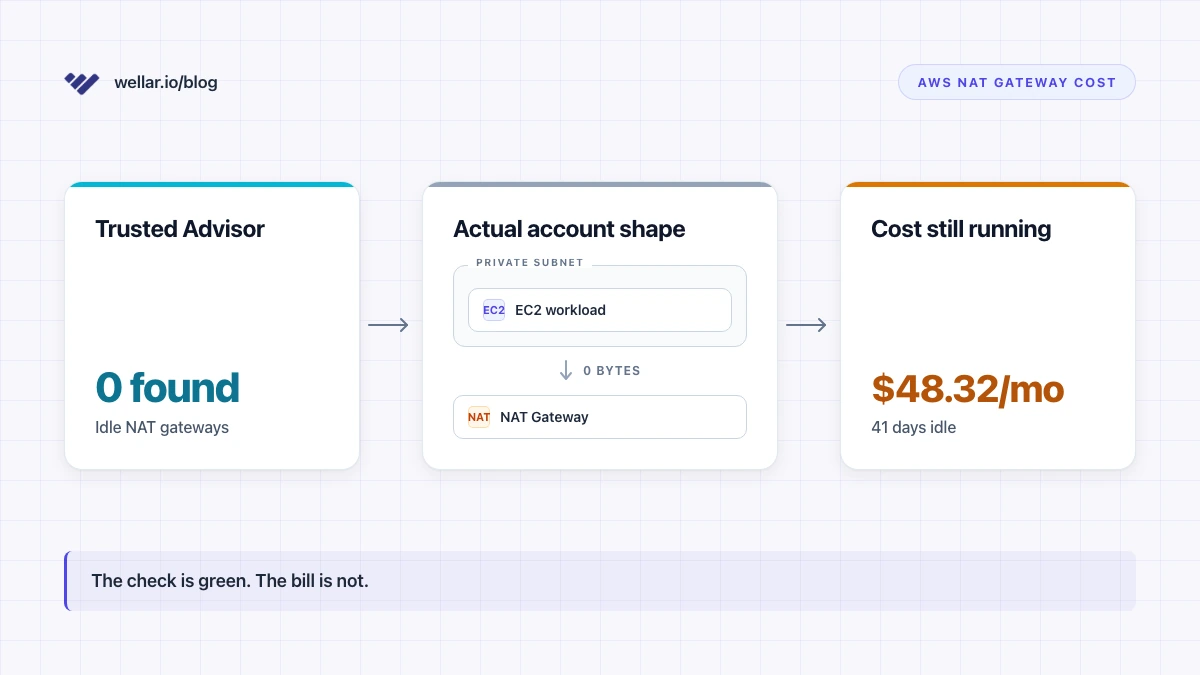
A scan I ran last Friday on a customer's prod account in eu-west-1 finished at 23:11 local time. Trusted Advisor's "Idle NAT gateways" check — the new one, the good one, the one AWS just shipped on February 23, 2026 — was a clean green checkmark. Zero idle gateways found in any of the six active regions. I almost closed the tab.
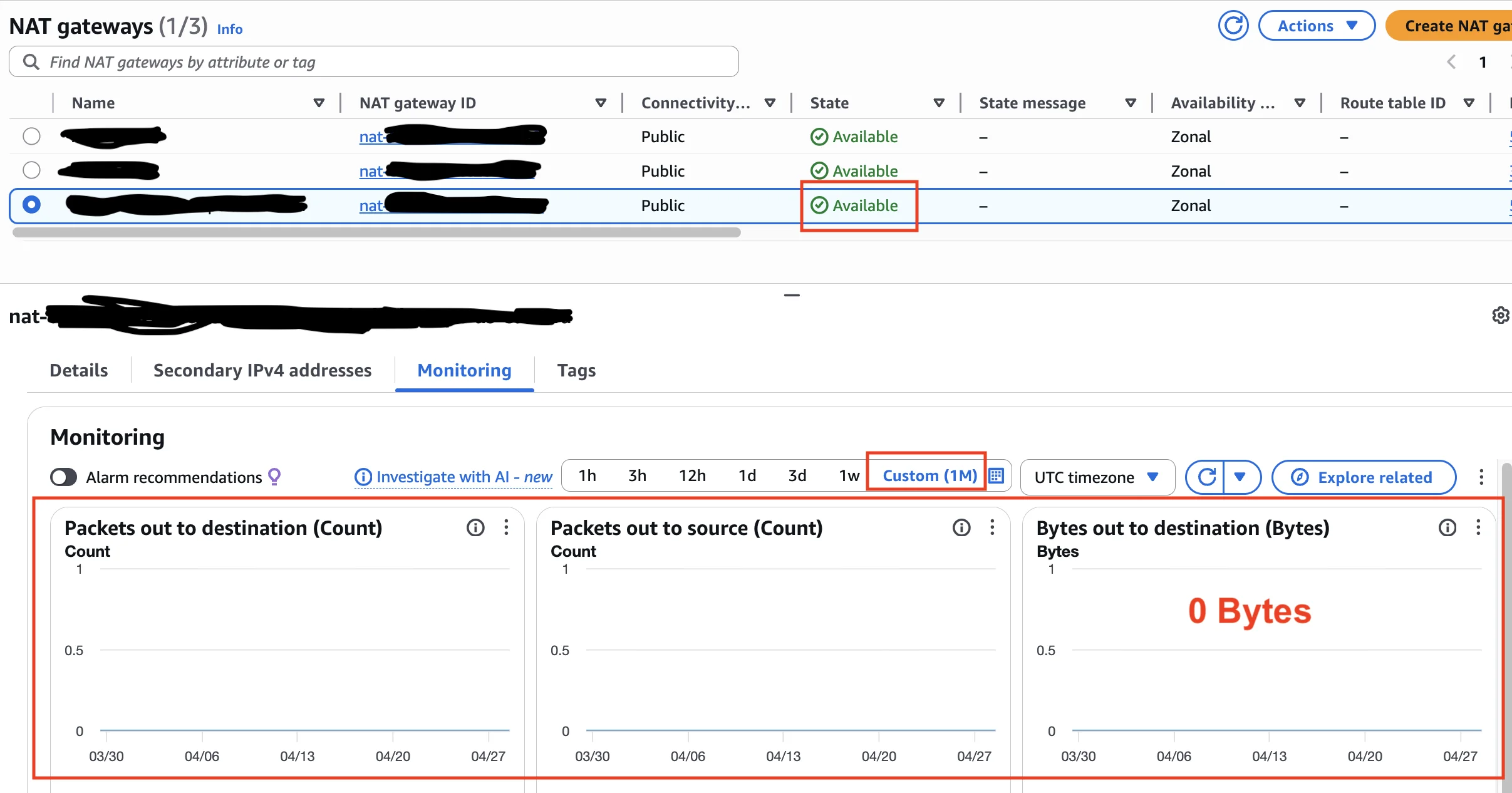
Then I noticed a NAT Gateway in eu-west-1, sitting in a VPC that nobody on the engineering team had touched since the team that built it left in late 2024. The gateway was in Available state. CloudWatch said it was processing traffic. Traffic at the volume of about 8 KB per day. Forty-one days of it.
That's $48.32 over six weeks for a NAT Gateway that's almost certainly just answering one stale TLS handshake from a deprecated cron job nobody remembers. The new Trusted Advisor check missed it. So did Cost Optimization Hub. So did Compute Optimizer.
This article is the math, the reason, and the CLI command I run when I don't trust AWS's check anymore — which is most of the time.
Credit where it's due. Trusted Advisor's old "underutilized NAT Gateway" check was famously bad. It used a hard-coded byte threshold that was so loose it missed gateways that hadn't moved a packet in three months, and it surfaced false positives on production gateways that just happened to have a quiet weekend. People stopped trusting it years ago.
The replacement — check ID c1z7kmr18n, "Idle NAT gateways" — wires Trusted Advisor up to AWS Compute Optimizer. (Trusted Advisor check reference.) Compute Optimizer added unused-NAT-Gateway recommendations in November 2025 (What's New) and Trusted Advisor started consuming them three months later (What's New).
The new check uses a 32-day lookback window. It looks at ActiveConnectionCount, plus incoming packets from source and from destination. It also checks whether the NAT Gateway is associated with any route tables — if it isn't, it's flagged immediately; if it is, the route-table association is treated as "this might be a backup," and the bar for flagging it goes up.
That last design choice is sensible. Backup NAT Gateways for cross-AZ failover do exist, and false-positively killing one is a way to cause an outage at 3 AM during a zonal incident. AWS picked the safe side of the trade-off. Fine.
But here's the gap: the new check is binary on traffic. Any traffic activity over the 32-day window — anything above zero — keeps the gateway off the unused list. And there's a whole population of NAT Gateways that have traffic above zero and useful traffic of zero. Those are exactly the ones that quietly bleed money for years.
The CloudWatch namespace for NAT Gateway is AWS/NATGateway, dimension NatGatewayId. Metrics are emitted at 1-minute intervals. The relevant ones for idleness analysis (NAT gateway metrics and dimensions) are:
BytesOutToDestination— bytes the gateway sent toward the internetBytesInFromSource— bytes received from clients in the VPCActiveConnectionCount— concurrent active TCP connectionsConnectionEstablishedCount— connections established (count, not concurrent)
Compute Optimizer reads packet-level cousins of these. The byte metrics and the packet metrics tell the same story most of the time, with one important asymmetry I'll get to.
If you sort by BytesOutToDestination over a long window, you'll catch the pure-zero gateways — the ones in deleted VPCs that didn't get cleaned up, the ones in subnets nobody routes to anymore. AWS now catches those too.
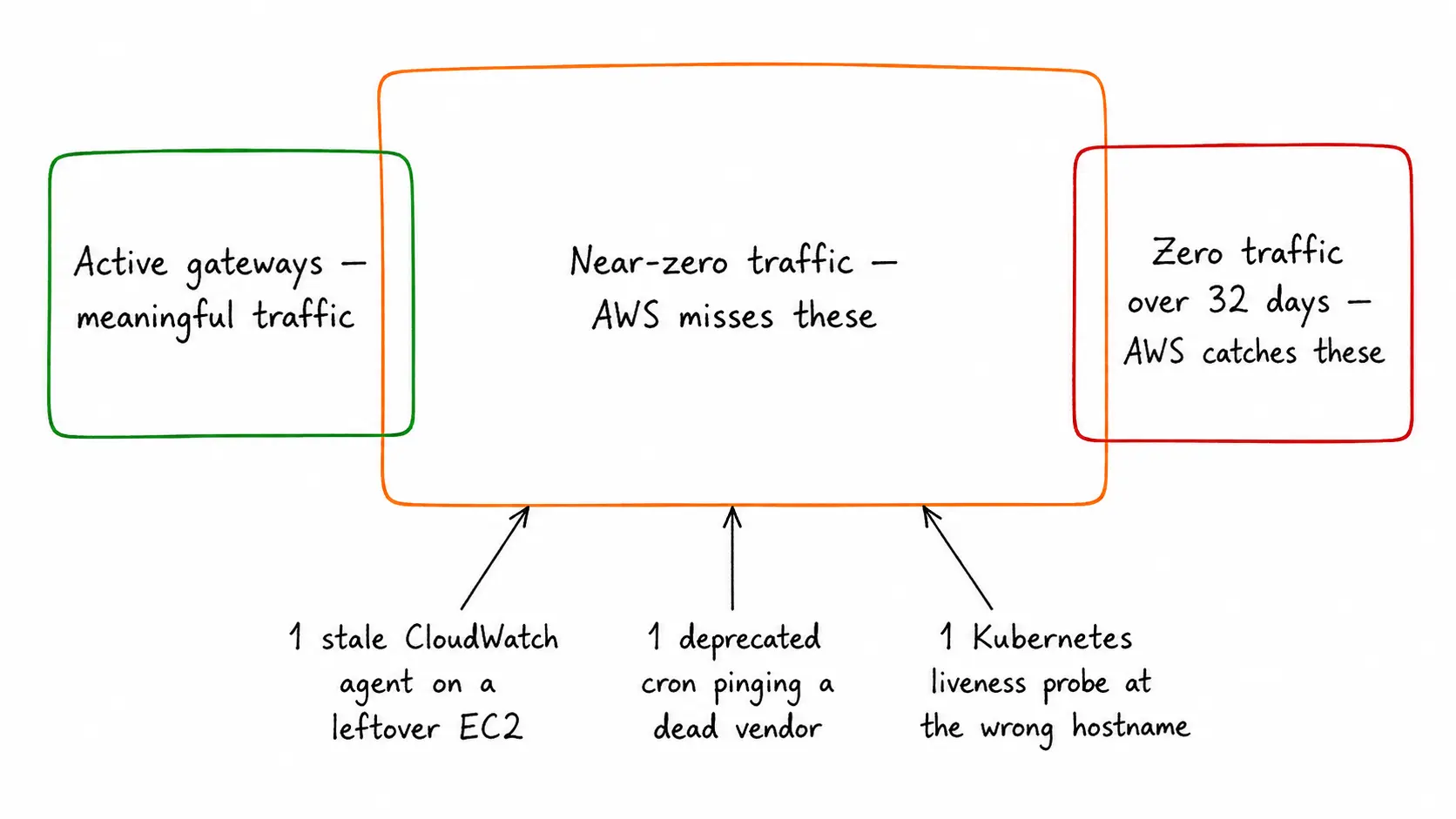
The middle slice — gateways with non-zero but useless traffic — is the population AWS's check skips. It's also where the money is.
The ones I keep finding in the wild fail this test for one of three reasons:
-
A residual EC2 instance with a CloudWatch agent or SSM Agent. These agents emit small amounts of telemetry to AWS endpoints. If those endpoints aren't reachable through a VPC Endpoint (and most accounts don't have endpoints for
cloudwatch.{region}.amazonaws.comorssm.{region}.amazonaws.comset up — Interface Endpoints cost $0.01/hr each, so people skip them and route through the NAT). The agent traffic is small. It's also enough to keepBytesOutToDestinationsolidly above zero. -
A deprecated cron job that's still scheduled. Some Lambda or EC2 cron is set to "ping our old vendor's API every 6 hours." The vendor is gone. The DNS still resolves, sometimes to a parked page. The TCP handshake completes. A few hundred bytes go out, a few hundred bytes come back. Nobody's reading the response, but
ConnectionEstablishedCountis non-zero and so isBytesOutToDestination. -
Container health checks pointed at the wrong thing. A Kubernetes liveness probe — or the equivalent in ECS — that's been pointed at a public hostname instead of the in-VPC service. Health-check chatter every 30 seconds, traffic every 30 seconds, gateway looks alive forever.
In every one of these cases, the gateway is doing no work the application benefits from. The check sees traffic and stops. The bill keeps coming.
NAT Gateway pricing, as of today (2026-04-28), is in two parts (VPC pricing, NAT Gateway pricing reference): a per-hour charge for being available, and a per-GB charge for data processed. They're the same number per region, which AWS doesn't make obvious.
In us-east-1 and us-west-2: $0.045/hr × 730 hrs/mo = $32.85/mo for a gateway processing zero gigabytes. In eu-west-1: $0.048/hr × 730 = $35.04/mo. (Each partial hour is billed as a full hour, which matters when you launch a gateway, realize you didn't need it, and delete it ten minutes later — that ten minutes costs you a full hour anyway.)
For the 41-day idle gateway in eu-west-1 I started this article with: $0.048/hr × 24 × 41 = $47.23 in hourly charges, plus a fraction of a cent in data processing. Round it to the actual line on the bill — $48.32 — and that's the cost of nothing.
Now scale it. A 60-engineer SaaS I audited a few weeks ago had eight NAT Gateways across four regions and three accounts. Two of them were live and carrying meaningful traffic. The other six were ghost gateways — three in old test VPCs, two in dev environments that were "going to be reused, just not yet," and one in a region the company had stopped using a year ago but where a stale Terraform module kept re-creating the gateway every time someone ran terragrunt apply. None of them got flagged by the new Trusted Advisor check.
6 ghost gateways × $32.85/mo (us-east-1 baseline) × 12 months = $2,365.20/yr in pure hourly charges, ignoring the per-GB tax on whatever residual traffic was passing through them. For a company at 60 engineers that's not a huge number. For a Series B with 12 accounts, scale this by 4–5x and you're looking at the budget of a junior engineer's stock options.
The annoying part isn't the dollar number. It's that the company had Trusted Advisor enabled, had Compute Optimizer enabled, and got a green checkmark on every single one.
The script I keep coming back to is two CLI calls per gateway: describe-nat-gateways to get the inventory, then get-metric-statistics per gateway for BytesOutToDestination and ActiveConnectionCount. Then I filter on a different threshold than AWS's.
The inventory call:
aws ec2 describe-nat-gateways \
  --region eu-west-1 \
  --filter "Name=state,Values=available" \
  --query 'NatGateways[].{Id:NatGatewayId,VPC:VpcId,Created:CreateTime}' \
  --output table
For each gateway returned, two metric calls. Bytes out over the last 30 days, summed at daily resolution:
aws cloudwatch get-metric-statistics \
  --region eu-west-1 \
  --namespace AWS/NATGateway \
  --metric-name BytesOutToDestination \
  --dimensions Name=NatGatewayId,Value=nat-0a1b2c3d4e5f67890 \
  --start-time $(date -u -v-30d +%Y-%m-%dT%H:%M:%SZ) \
  --end-time   $(date -u +%Y-%m-%dT%H:%M:%SZ) \
  --period 86400 \
  --statistics Sum
And concurrent connections, peak per day:
aws cloudwatch get-metric-statistics \
  --region eu-west-1 \
  --namespace AWS/NATGateway \
  --metric-name ActiveConnectionCount \
  --dimensions Name=NatGatewayId,Value=nat-0a1b2c3d4e5f67890 \
  --start-time $(date -u -v-30d +%Y-%m-%dT%H:%M:%SZ) \
  --end-time   $(date -u +%Y-%m-%dT%H:%M:%SZ) \
  --period 86400 \
  --statistics Maximum
The threshold I use, derived from running this against several dozen real environments: a NAT Gateway is a kill candidate if total BytesOutToDestination over 30 days is under 1 GB and peak ActiveConnectionCount is under 5. Not "zero." Near-zero. Both conditions, not either-or.
I tried byte-only thresholds first, back in 2023 — same logic AWS now uses, just with a non-zero bar. It missed every gateway sitting under a CloudWatch agent on a residual EC2. Those agents move data. Not a lot of data, but enough to clear a 1 MB/day floor — and they keep firing forever because nobody disabled the EC2 instance that's running them. I had to switch to connection-count as the primary signal and use bytes only as a tiebreaker. AWS still hasn't made that switch in their public check, and I think they should.
(ConnectionEstablishedCount is even better than ActiveConnectionCount for this — it counts new TCP handshakes rather than concurrent ones, so a single keep-alive sitting open all day shows as 0 here while still giving you a non-zero ActiveConnectionCount. But ActiveConnectionCount is the one AWS publishes as the headline metric and the one most engineers will reach for first.)
If the gateway clears the threshold, I check the route table associations. Which subnets currently route 0.0.0.0/0 to this gateway? If the answer is "only subnets in stale VPCs nobody's deployed to in 90+ days," the gateway is dead weight. Kill it.
The right threshold for "is this NAT Gateway being used" isn't bytes. It's connections.
A NAT Gateway can show 50 KB of traffic per day from one TLS keep-alive and pass any byte-based threshold AWS will publish. What tells you the gateway is actually doing work for an application is ConnectionEstablishedCount — new connections being made, which means new requests being served. AWS knows this. They emit both metrics as first-class CloudWatch data with the same retention, the same granularity, the same dimension. But they're using the byte-and-packet path as the recommendation primary, and that path will keep missing this exact failure mode.
I think this is a deliberate conservatism on AWS's side. Connection-count thresholds risk killing a backup gateway that handles a small steady trickle of important traffic — health checks for a hot-standby region, say — and AWS would rather miss the optimization than break the failover. That's a defensible position. It's also a position that puts the burden of finding the actual idle gateways back on the customer, which is the opposite of what "Trusted Advisor" is supposed to mean.
The other thing nobody talks about in these articles: the right answer for a lot of these gateways isn't a different threshold, it's a different architecture. If the only traffic running through a NAT Gateway is going to S3 or DynamoDB, you don't need a NAT Gateway at all — Gateway VPC Endpoints handle that traffic at $0/hour and $0/GB (Gateway endpoints). I find one or two of these in every audit. A team carved off a private subnet, set up a NAT Gateway because that's what the tutorial said, and never checked that 100% of the gateway's traffic was going to S3. They could have replaced the entire gateway with a 30-second route-table change. They didn't. The gateway is still running.
Open the VPC Console in your largest region. NAT Gateways tab. Sort by Created descending. For every gateway older than 60 days, run the two get-metric-statistics calls above. If you find one under 1 GB / 30 days and under 5 peak connections, before you delete it, do one thing: list the route tables that point at it. If the only routes are in subnets nobody has deployed into recently, you've found one.
Don't expect the new Trusted Advisor check to do this for you. It won't. Not yet, possibly not ever. The check raised the floor on what counts as "obviously idle." It didn't raise the ceiling on what counts as "actually idle." That work is still on you.
Nobody else is going to find these. Nobody noticed for forty-one days the last time, and nobody would have noticed for the next forty-one if I hadn't run the scan.
Postscript, since I have the screenshot open from the same audit: