Your production Postgres runs on RDS: a db.r7g.large, Multi-AZ, 500 GB of data, $463.94 a month in us-east-1. In an architecture review somebody asks why it isn't on Aurora yet, and nobody has priced the move. The same database on Aurora, a writer plus a reader in a second zone, costs $636.64 a month on I/O-Optimized storage, or $689.48 on Aurora Standard at 450 I/Os a second, the rate AWS uses in its own pricing example.
So moving this database from RDS to Aurora adds $172.70 a month on demand, 37% for the same instance size, or $132.60 if you reserve both for a year. For a steady workload, Aurora vs RDS comes down to whether you'll use what that buys. A reader that serves real traffic and takes over in under a minute is worth it, and so is Serverless v2 for a database that sits idle most of the week. One steady database that RDS already runs with a standby isn't. And if you'd add an RDS read replica anyway, the answer flips. Multi-AZ plus a replica comes to $695.91, and Aurora I/O-Optimized undercuts it by $59.27 a month.
Every price here is us-east-1, on demand unless I say otherwise, from AWS's pricing pages and Price List API on 12 October 2026. The decision tree here is for teams under roughly $50K a month of AWS spend, where nobody's full-time job is tuning database capacity.
It's the database-shaped version of the triage in the 8 questions to ask before touching the console.
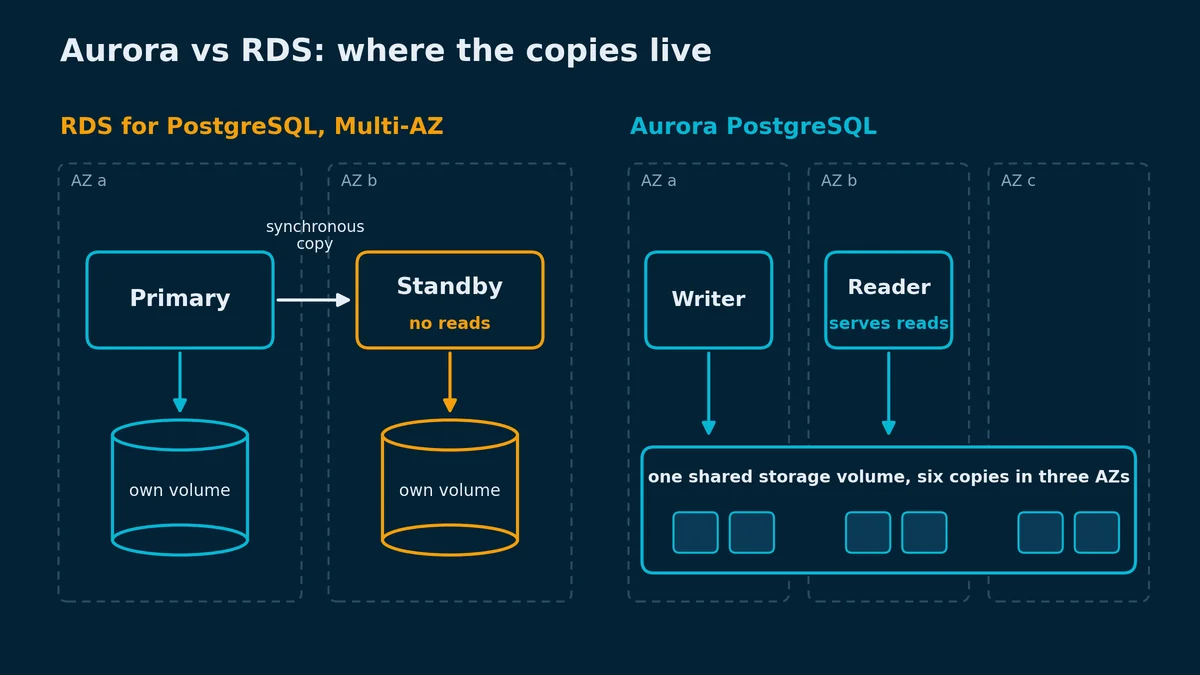
Yes, and that's half the confusion. Amazon Aurora is a MySQL- and PostgreSQL-compatible database engine that AWS sells inside Amazon RDS: same console, same aws rds commands, same line on your bill (Aurora User Guide). What differs is underneath. RDS for PostgreSQL and RDS for MySQL run the community engines on EBS volumes that you size and pay for by the provisioned GB, up to 64 TiB (RDS storage). Aurora runs AWS's modified engines on one shared cluster volume. It keeps six copies of your data across three Availability Zones (Aurora high availability), grows by itself to as much as 256 TiB, and bills only for the space you use (Aurora storage).
Almost every price difference below follows from that design. RDS Multi-AZ keeps a second full server with its own volume in another zone, and you pay for both. Aurora's storage is already in three zones, so high availability only means adding an instance.
(The naming doesn't help. RDS also sells a "Multi-AZ DB cluster", which isn't an Aurora DB cluster, and the RDS docs need a warning box to say so. I'd rename it if anyone asked.)
The unit prices, us-east-1, on demand, from the Aurora, RDS for PostgreSQL and RDS for MySQL pricing pages. At this size PostgreSQL and MySQL cost the same on both sides.
| RDS for PostgreSQL or MySQL | Aurora Standard | Aurora I/O-Optimized | |
|---|---|---|---|
db.r7g.large, per hour | $0.239 Single-AZ, $0.478 Multi-AZ | $0.276 | $0.359 |
| Serverless v2, per ACU-hour | not offered | $0.12 | $0.16 |
| Storage, per GB-month | $0.115 gp3, $0.23 on Multi-AZ | $0.10 | $0.225 |
| I/O | included: 3,000 IOPS on gp3, 12,000 from 400 GiB | $0.20 per million | included |
Three things in that table decide most comparisons. An Aurora instance-hour costs 15.5% more than the same RDS one ($0.276 ÷ $0.239 = 1.155). Multi-AZ on RDS doubles both the instance and the storage price. And Aurora Standard has a meter RDS doesn't: you're billed a read for every page the engine has to fetch from storage because it isn't in the buffer cache, plus the writes (Aurora metrics).
The opening workload, long-form:
RDS for PostgreSQL, Multi-AZ (one standby, which can't serve reads)
  instances   $0.478 × 730 h                                 = $348.94
  storage     500 GB × $0.23                                 = $115.00
  total                                                        $463.94

Aurora PostgreSQL Standard, writer + reader in a second AZ
  instances   2 × $0.276 × 730 h                             = $402.96
  storage     500 GB × $0.10                                 =  $50.00
  I/O         450/s × 3,600 s × 730 h = 1,182.6M × $0.20/M   = $236.52
  total                                                        $689.48

Aurora PostgreSQL I/O-Optimized, same two instances
  instances   2 × $0.359 × 730 h                             = $524.14
  storage     500 GB × $0.225                                = $112.50
  total                                                        $636.64
I/O-Optimized is the Standard price list with the I/O line deleted and the rest raised: instances cost 30% more ($0.276 to $0.359 for a db.r7g.large), an ACU-hour a third more ($0.12 to $0.16), and storage 2.25 times as much, $0.10 to $0.225 per GB-month (Aurora pricing). So it wins when your I/O bill is bigger than 30% of your instance bill plus 125% of your storage bill. Here the premium is $524.14 − $402.96 = $121.18 on the instances plus $112.50 − $50.00 = $62.50 on storage, $183.68 in all, against $236.52 of I/O that disappears, so I/O-Optimized saves $52.84 a month. AWS's rule of thumb says the same thing more loosely: pick I/O-Optimized when I/O is 25% or more of your total Aurora bill (Aurora storage). That holds while instances are most of the bill (with no storage at all, the break-even is 0.3 ÷ 1.3 = 23%), and it drifts as storage grows. You can move a cluster to I/O-Optimized once every 30 days, and back whenever you like.
Which is cheaper, Aurora or RDS? On a single instance it's RDS, almost every time: $174.47 a month for a Single-AZ db.r7g.large against $201.48 for Aurora's, before Aurora bills its first I/O. High availability changes the arithmetic, because RDS Multi-AZ pays for its storage twice and Aurora pays once. Two Aurora instances cost $54.02 a month more than an RDS Multi-AZ pair ($402.96 − $348.94), and every GB stored saves $0.13 ($0.23 − $0.10). With no I/O at all, Aurora Standard breaks even at $54.02 ÷ $0.13 = 416 GB. Each sustained I/O per second, though, adds $0.5256 a month (3,600 × 730 ÷ 1,000,000 × $0.20), so at 450 a second the break-even moves out to ($54.02 + $236.52) ÷ $0.13 = 2,235 GB.
I'll give the Aurora side its strongest point, which is storage. On a 2 TB Multi-AZ database, Aurora's storage is 2,000 × $0.13 = $260 a month cheaper, enough to cover the $54.02 instance premium with $205.98 left over. The I/O meter takes it back: at 450 I/Os a second it's $236.52, and Aurora Standard ends up $30.54 a month behind RDS. I/O-Optimized doesn't rescue it. The I/O is 28% of the $839.48 Standard bill, past AWS's 25%, but at 2 TB the storage premium is $450.00 − $200.00 = $250.00, so I/O-Optimized costs $134.66 more than Standard. (RDS has a meter too. It just starts later. gp3 includes 12,000 IOPS from 400 GiB up, and past that Multi-AZ charges $0.04 per provisioned IOPS-month: a database that needs 20,000 IOPS pays 8,000 × $0.04 = $320 a month for the difference. The gp2 to gp3 post walks through the same baseline-versus-provisioned math for plain EBS.)
Most teams would reserve a steady production database, so compare reserved with reserved. A 1-year No Upfront Reserved Instance takes about 23% off on both sides: $0.3682 an hour for the RDS Multi-AZ db.r7g.large (RDS for PostgreSQL pricing) and $0.2128 for each Aurora one. Reservations don't cover storage or I/O, and an I/O-Optimized instance uses 30% more of a reservation, so it needs 1.3 of them (Aurora reserved instances):
RDS for PostgreSQL, Multi-AZ, reserved
  instances   $0.3682 × 730 h                                = $268.79
  storage     500 GB × $0.23                                 = $115.00
  total                                                        $383.79

Aurora PostgreSQL I/O-Optimized, writer + reader, reserved
  instances   2 × 1.3 × $0.2128 × 730 h                      = $403.89
  storage     500 GB × $0.225                                = $112.50
  total                                                        $516.39
The gap shrinks from $172.70 to $132.60, because only the instance lines get the discount. The read-replica flip survives: a reserved RDS replica adds $0.1841 × 730 = $134.39 plus $57.50 of storage, RDS comes to $575.68, and Aurora I/O-Optimized is still $59.29 a month cheaper.
RDS's own answer to Aurora's readable replica is the Multi-AZ DB cluster: a writer and two readable standbys in three zones (RDS Multi-AZ DB clusters) that typically fails over in under 35 seconds (failover). It only runs on instance classes with local NVMe, such as db.r6gd, db.m6gd and db.r8gd. For this workload a db.r8gd.large cluster is $0.819 × 730 = $597.87 plus 500 GB × $0.345 = $172.50 of gp3, $770.37 a month on demand: more than Aurora with one reader, less than Aurora with two ($898.71 on I/O-Optimized).
To price your own region, use the Price List API. Its us-east-1 endpoint answers for every region, so keep --region us-east-1 and set regionCode to the region you want to price:
for engine in "PostgreSQL" "Aurora PostgreSQL"; do
  aws pricing get-products --region us-east-1 --service-code AmazonRDS \
    --filters Type=TERM_MATCH,Field=regionCode,Value=us-east-1 \
              Type=TERM_MATCH,Field=instanceType,Value=db.r7g.large \
              "Type=TERM_MATCH,Field=databaseEngine,Value=$engine" \
    --output json \
  | jq -r '.PriceList[] | fromjson | .terms.OnDemand[].priceDimensions[].description'
done
It prints four lines: the RDS Single-AZ and Multi-AZ rates, then Aurora Standard and Aurora I/O-Optimized. Use MySQL and Aurora MySQL for the MySQL engines.
Failover first. With at least one Aurora Replica, AWS says service typically comes back in under 60 seconds and often under 30; with no replica, Aurora recreates the writer, which typically takes under 10 minutes (Aurora high availability). RDS Multi-AZ failover typically takes 60 to 120 seconds (RDS failover), and the standby can't serve a single read while it waits (RDS Multi-AZ).
Then readers. An Aurora cluster takes up to 15 Aurora Replicas, and because they read the writer's cluster volume, with no copy of their own to keep current, replica lag is usually much less than 100 milliseconds (Aurora replication). An RDS read replica is another instance, billed at the full instance rate, with its own storage that the engine's asynchronous replication keeps up to date (RDS read replicas).
The rest is what RDS doesn't offer at all: Global Database for cross-Region recovery, Serverless v2, and on MySQL, Backtrack. Use Aurora instead of RDS when one of these is on your plan for the next six months.
AWS's Aurora page says it "offers 6x the throughput of PostgreSQL and MySQL" (Amazon Aurora), and the user guide words the same claim as up to 6x on similar hardware (Aurora overview). The reason is the write path. Aurora's engine sends only log records to the storage layer and never issues checkpoints (Planning I/O in Aurora), and a write is durable once four of the six storage nodes have it (AWS Database Blog). That 2016 write-up put the result at about one eighth of MySQL's IOPS for a similar workload. RDS for PostgreSQL and MySQL write data pages and logs to EBS the way a self-managed server does, and Multi-AZ adds a synchronous copy to the standby, which AWS warns can raise write and commit latency (RDS Multi-AZ). Less I/O per commit is where the throughput claim comes from, and the shared volume is why readers lag by milliseconds.
My read of the 6x is that it comes from write-heavy work, because the write path is where the engines differ. A read-mostly app whose working set fits in memory serves the same cached pages on both engines, and neither one touches storage for them. A query that scans a table it shouldn't will scan it on Aurora too, and the fix is the same missing index on either engine.
If you run Postgres on RDS today, moving to Aurora Postgres also moves you onto a slower release calendar. RDS for PostgreSQL commits to new major versions within 30 days of the community's first minor release, and to new minor versions within 7 days (RDS for PostgreSQL calendar). Aurora PostgreSQL commits to 8 months and 3 months (Aurora PostgreSQL calendar). PostgreSQL 18 reached RDS on 14 November 2025 and Aurora on 11 June 2026, 209 days later. In 2026 the quarterly minor releases reached Aurora between five and fourteen weeks after RDS; the August set landed on RDS on 25 August and on Aurora on 29 September. If you patch the week a minor ships, plan for the wait.
MySQL has the same shape with a longer gap. RDS for MySQL has offered MySQL 8.4 LTS since 21 November 2024 (What's New), and Aurora MySQL's 8.4-compatible version shipped on 21 May 2026, eighteen months later (Aurora MySQL calendar). Aurora MySQL does have one feature I'd pay for on its own. Backtrack rewinds the whole cluster up to 72 hours in minutes, without a restore, which makes it the fastest undo for a DELETE without a WHERE that I know of. You have to switch it on when you create the cluster, and Aurora PostgreSQL doesn't have it (Backtrack).
For RDS for PostgreSQL and RDS for MySQL, the path AWS documents first is an Aurora read replica of the RDS instance (PostgreSQL, MySQL):
- In the RDS console, choose Databases, select the RDS instance, and choose Actions, then Create Aurora read replica. RDS builds an Aurora cluster from a snapshot and then keeps it in sync with the instance; AWS says to allow several hours per terabyte.
- When you're ready to cut over, stop writes to the RDS instance and wait for replica lag to reach zero:
RDSToAuroraPostgreSQLReplicaLagin CloudWatch on PostgreSQL,SHOW REPLICA STATUSon MySQL. - Select the replica cluster and choose Actions, then Promote. On PostgreSQL, AWS warns this "may take a few minutes and can cause downtime".
- Point the application at the new cluster endpoint. It's a new hostname, so this is a configuration change you deploy.
Your write freeze runs from step 2 to step 4, so rehearse it on a copy first. Check the limits first, too. On PostgreSQL the replica path works only within one Region and account, and Aurora needs your exact RDS version or a higher minor of the same major, which is why AWS suggests turning off auto minor version upgrades on the RDS instance early in planning (Aurora PostgreSQL migration). On both engines you get one Aurora read replica per RDS instance, and an encrypted instance can't become an unencrypted cluster.
The simpler path is a snapshot migration (PostgreSQL, MySQL): restore an RDS snapshot into a new Aurora cluster, which suits a database that can stop taking writes for the whole restore. Blue/Green Deployments don't help with this move. AWS describes them for changes on the same engine, such as version upgrades, parameter changes and a new instance class (Blue/Green Deployments).
Serverless v2 cuts both ways. Picture a database on a provisioned db.r6g.large that sits idle 70% of the day: it's a good candidate to move onto Serverless v2. Picture another that's busy enough that the ACU meter never stops spinning: moved onto Serverless v2, its bill goes up, and it belongs back on a provisioned instance. (Every price here uses the current db.r7g.large rather than the older db.r6g.large.)
Aurora Serverless v2 pricing is a single rate: $0.12 per ACU-hour on Aurora Standard in us-east-1 and $0.16 on I/O-Optimized, metered per second (Aurora pricing). An ACU is about 2 GiB of memory with the CPU and networking to match, and capacity runs from 0 to 256 ACUs in steps as small as 0.5 (how Aurora serverless works). (AWS renamed it "Aurora serverless" in April 2026; I'll keep saying v2, because everyone else does.)
Whether Amazon Aurora Serverless v2 beats a provisioned Aurora or RDS instance depends on its average capacity over a week. A db.r7g.large has the memory of 8 ACUs, and 8 ACUs all month cost 8 × $0.12 × 730 = $700.80, against $201.48 provisioned on Aurora and $174.47 on RDS. The bills match at $201.48 ÷ ($0.12 × 730) = 2.3 ACUs on average against Aurora, 29% of the 8, and at $174.47 ÷ $87.60 = 1.99 ACUs (25%) against RDS; commitments move the line between 22% and 35%. Under about a quarter of the instance you'd otherwise buy, Serverless v2 wins, and over about a third, provisioned does. In between, measure your own curve.
Take a seed-stage team whose production database averages 1.5 ACUs, with dev and staging busy 40 hours a week at 1 ACU and paused the rest: 1.5 × $0.12 × 730 + 2 × $0.12 × 173.8 h (40 h × 730 ÷ 168) = $131.40 + $41.71 = $173.11. A provisioned db.r7g.large and two always-on db.t4g.medium copies cost $201.48 + 2 × $0.073 × 730 = $308.06. A paused copy bills nothing but storage.
Then take a Series A SaaS at about 6 ACUs for 11 hours each weekday and 1 ACU for the other 113 hours of the week, (6 × 55 + 113) ÷ 168 = 2.64 ACUs on average: 6 × $0.12 × 239.0 h + $0.12 × 491.0 h = $230.99 a month, against $201.48 provisioned. Let the quiet hours fall to 0.5 ACU and it's $201.53, a tie, so the quiet hours are the number to measure. A database that's busy around the clock is the one place I'd never put Serverless v2.
On RDS there's no ACU metric, and CPU alone will mislead you. An ACU is defined by memory, and AWS says Serverless v2 tracks CPU, memory and network, with most scaling coming from memory and CPU (Aurora serverless capacity). Graph CPUUtilization, FreeableMemory and NetworkThroughput in CloudWatch under Metrics, All metrics, RDS, Per-Database Metrics, at a 1-hour period over two weeks. AWS's own way to estimate the range is by the memory of the instance classes you'd otherwise move between: if the quiet hours would fit an instance a quarter the size of your peak one, you're in Serverless v2 territory.
Three things push the bill past that math. AWS recommends a floor that keeps the working set in the buffer pool, so a 6 GiB working set means about 3 ACUs, 3 × $87.60 = $262.80 a month before a query runs. A 0-ACU floor pauses the instance, but the first connection after a pause waits about 15 seconds, or 30 and more after a day paused (auto-pause); dev and internal tools can live with that, but a customer-facing request path usually can't. And a reader in promotion tier 0 or 1, the failover tiers, keeps at least the writer's capacity, so a highly available cluster bills twice the writer's ACUs (how Aurora serverless works).
Then RDS Proxy. A proxy holds an open connection to every instance in the cluster, so a Serverless v2 instance behind one never pauses (auto-pause), and it charges a Serverless v2 database for at least 8 ACUs at $0.015 per ACU-hour (RDS Proxy pricing): 8 × $0.015 × 730 = $87.60 a month, twice a 0.5 ACU floor. On a small database that can turn a "serverless to save money" move into a bill above the provisioned instance it replaced, so watch ServerlessDatabaseCapacity for the first month.
I don't like RDS Proxy on small Serverless v2 databases at all. If Lambda connection storms are why you want one, I'd take that as a sign the database belongs on a provisioned instance with a connection pooler that doesn't bill by the ACU.
Reserved Instances don't cover ACU-hours; AWS's price list has no reserved rate for them (Aurora reserved instances). Database Savings Plans, announced on 2 December 2025, do (What's New): a dollar-per-hour commitment for a year with nothing upfront, and anything above it at on-demand rates (Database Savings Plans). In us-east-1 that's $0.078 per ACU-hour, 35% off, against 20% off a db.r7g.large, and only the latest instance generations qualify (Savings Plans types), so a steady provisioned instance is still cheaper on a Reserved Instance, $0.2128 against $0.2208 an hour. Size the plan to the floor. The Series A workload with its 1-ACU floor committed bills (1 × $0.078 + 5 × $0.12) × 239.0 h + $0.078 × 491.0 h = $200.33; commit 2 ACUs and the second one sits unused through every quiet hour, (2 × $0.078 + 4 × $0.12) × 239.0 h + $0.156 × 491.0 h = $228.60. The plans are less than a year old, so model one on two weeks of ServerlessDatabaseCapacity data before you buy.
For the teams this tree is for, I'd default to RDS for PostgreSQL or MySQL, Multi-AZ in production and reserved once its size has held for a few months, and make Aurora earn its place. It earns it when you can name what you'll use in the next six months: a reader that carries real traffic, failover under a minute, Global Database, Backtrack, or Serverless v2 for a database that's idle most of the week. If you can't name one, the 15.5% instance premium and the I/O meter buy a storage layer you'll never notice. Keep dev and staging on the same engine as production, because RDS in production with Aurora dev copies means two release calendars. On RDS, run them as small instances you stop at night (a stopped instance starts itself again after 7 days (RDS stop)); on Aurora, put them on Serverless v2 with a 0-ACU minimum.
If you're on RDS, you can estimate the Aurora I/O bill from metrics you already have. Aurora bills one read for each page it pulls from storage, 8 KiB pages on Aurora PostgreSQL and 16 KiB on Aurora MySQL, and writes only log records, in 4 KiB units, batching small records when several are ready at once (Planning I/O in Aurora). For RDS for PostgreSQL, over a typical week:
- Take the average
ReadThroughput(bytes read per second) and divide by 8,192 for reads per second. Use 16,384 on MySQL. - Take the average
TransactionLogsGeneration(WAL bytes written per second) and divide by 4,096 for writes per second (RDS metrics). MySQL has no CloudWatch equivalent; sample the engine'sInnodb_os_log_writtencounter twice and divide the difference by the seconds between. - Add the two and multiply: I/Os per second × 3,600 × 730 ÷ 1,000,000 × $0.20 is the monthly I/O bill on Aurora Standard.
For the opening database, 2.73 MiB/s of reads is 2,867,200 ÷ 8,192 = 350 a second, 400 KiB/s of WAL is 409,600 ÷ 4,096 = 100 a second, and 450 × 3,600 × 730 ÷ 1,000,000 × $0.20 = $236.52. This prints a week of daily averages for both metrics:
for m in ReadThroughput TransactionLogsGeneration; do
  echo "$m"
  aws cloudwatch get-metric-statistics --region us-east-1 \
    --namespace AWS/RDS --metric-name "$m" \
    --dimensions Name=DBInstanceIdentifier,Value=my-rds-instance \
    --start-time $(date -u -v-7d +%Y-%m-%dT%H:%M:%SZ) \
    --end-time $(date -u +%Y-%m-%dT%H:%M:%SZ) \
    --period 86400 --statistics Average \
    --query 'sort_by(Datapoints,&Timestamp)[].[Timestamp,Average]' --output text
done
(That date syntax is macOS; on Linux, use date -u -d '7 days ago' +%Y-%m-%dT%H:%M:%SZ.) Treat the result as an estimate, because Aurora's cache won't miss exactly as often as RDS's does. Then compare it with 30% of the instance bill plus 125% of the storage bill to choose between Standard and I/O-Optimized. If you take the read-replica path, the replica cluster's VolumeReadIOPs and VolumeWriteIOPs, which report billed operations per 5 minutes, give you real numbers before the cutover (Aurora metrics).
If you're already on Aurora Standard, Compute Optimizer runs that comparison for each cluster: choose Aurora and RDS recommendations, then the Storage tab (AWS Cloud Financial Management blog), and switch under Modify, Cluster storage configuration in the RDS console (modifying an Aurora cluster).
And if the design doc says "Aurora" and nobody can say what the $172.70 a month buys, change it to RDS.