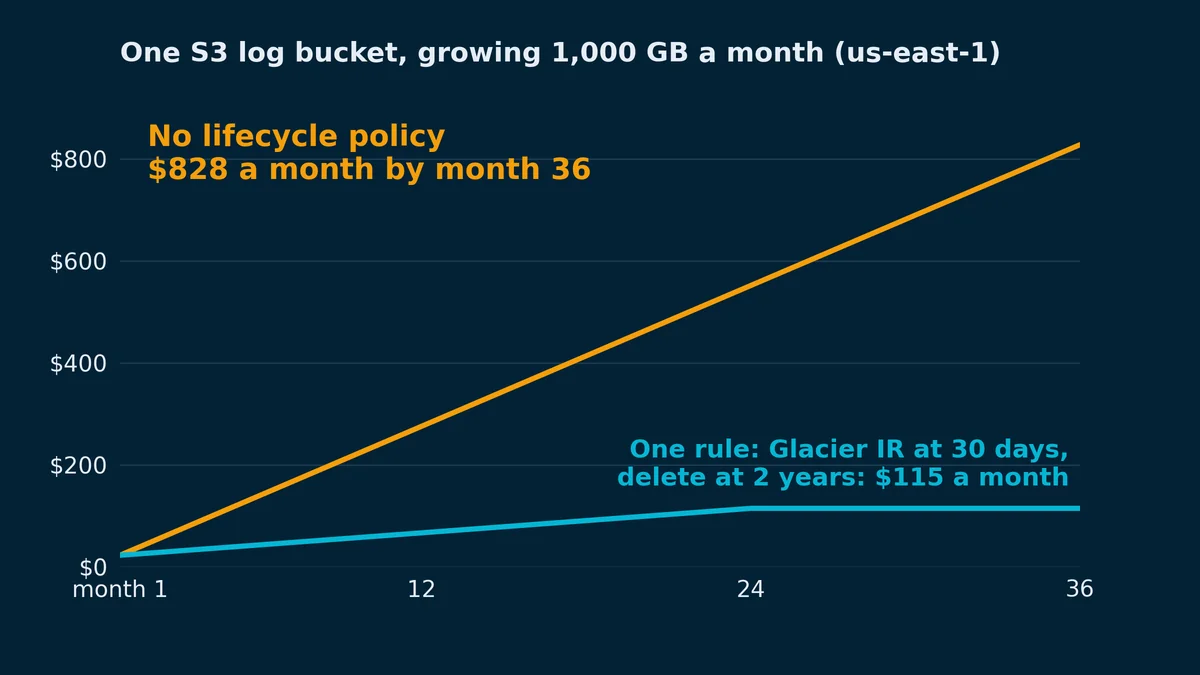
Imagine a 12-engineer fintech with an application-logs bucket: structured JSON from a Firehose stream, queried hard for the first week of each object's life and never again after that. Compliance wants two years kept. Fourteen months are already in there, about 14,000 GB, and all of it sits in S3 Standard because the bucket has no S3 lifecycle policy.
An S3 lifecycle policy is a set of rules on a bucket that tells S3 to move objects to a cheaper storage class, or delete them, once they reach a given age. With no policy, nothing ever moves. In that bucket 13,000 GB are more than a month old. At us-east-1 prices that's 13,000 × $0.023 = $299 a month in S3 Standard, against 13,000 × $0.004 = $52 in S3 Glacier Instant Retrieval, which still answers a GetObject in milliseconds. The missing policy costs $247 a month, and the gap grows by another $19 every month the bucket grows by its usual 1,000 GB. The first rule worth adding is one rule with two actions: move objects to Glacier Instant Retrieval at 30 days, and delete them at 730, when compliance stops caring.
That bucket is the simple kind: big objects, nobody reading them after the first week, and a known date to delete them. When any of those three is wrong, a rule that looks just as reasonable loses money.
Four things to check on every account, in order: is there a bucket over a few TB with no lifecycle rule, what's its average object size, how old is its oldest object, and is something writing kilobyte objects into a bucket somebody will later try to archive.
For one bucket, the order of work is:
- Find the biggest buckets still in S3 Standard, and their average object size, in Storage Lens.
- Run
get-bucket-lifecycle-configurationandget-bucket-versioningto see what's already set. - Find out whether anything still reads the data, with Storage Class Analysis, server access logs or CloudTrail data events.
- Pick the rule. Large objects that go cold at a known age get a transition and an expiration. Data nobody can describe goes to Intelligent-Tiering, still with an expiration. A bucket averaging under 128 KB gets an expiration and no transition.
- On a versioned bucket, also expire noncurrent versions.
- Write it in Terraform, then run
head-objecton one object to confirm the expiration rule matches it.
A lifecycle configuration belongs to one bucket and holds up to 1,000 rules. Each rule has a filter (a key prefix, object tags, a size range, or nothing, which means the whole bucket) and actions: move objects to another class, expire them, permanently delete old versions, or abort multipart uploads that never finished (lifecycle configuration elements). It applies to objects that are already there, too. Add a 30-day expiration today and S3 queues everything older than 30 days (setting a lifecycle configuration).
These are the prices the rules move objects between, in us-east-1, from the S3 pricing page on 12 October 2026:
| Storage class | Storage, per GB-month | Lifecycle transition into it, per 1,000 objects | Minimum storage duration | Small objects | Reading it back |
|---|---|---|---|---|---|
| S3 Standard | $0.023 (first 50 TB) | n/a | none | no floor | no retrieval fee |
| S3 Standard-IA | $0.0125 | $0.01 | 30 days | billed as at least 128 KB | $0.01 per GB |
| S3 Intelligent-Tiering | $0.023, $0.0125 or $0.004 by tier, plus $0.0025 per 1,000 objects for monitoring | $0.01 | none | under 128 KB stays in the frequent tier | no retrieval fee |
| S3 Glacier Instant Retrieval | $0.004 | $0.02 | 90 days | billed as at least 128 KB | $0.03 per GB |
| S3 Glacier Flexible Retrieval | $0.0036 | $0.03 | 90 days | 40 KB of overhead per object | restore first, minutes to hours |
| S3 Glacier Deep Archive | $0.00099 | $0.05 | 180 days | 40 KB of overhead per object | restore first, hours |
Standard costs 5.75 times what Glacier Instant Retrieval does per GB, and 23 times what Deep Archive does. Expiring an object costs nothing: S3 doesn't charge for the delete, and you stop paying for an object's storage at its expiration time even when the delete itself lands days later (expiring objects). Since July 2026 a rule can also move objects into Standard-IA or One Zone-IA on day 0, where S3 used to refuse anything before day 30 (What's New). The 30-day minimum charge didn't go anywhere.
At the fintech's growth rate, month 24 with no rule costs 24,000 × $0.023 = $552, and each month after that costs $23 more than the one before. With the two-action rule, month 24 holds one month of logs in Standard and 23 in Glacier IR: 1,000 × $0.023 + 23,000 × $0.004 = $23 + $92 = $115. It stays at $115, because from then on the expiration deletes a month of logs for every month that arrives.
The transitions are rounding error on a bucket like that. If Firehose writes objects close to its 128 MB maximum, a month of logs is about 8,000 objects, and moving them costs 8,000 ÷ 1,000 × $0.02 = $0.16. Deep Archive would take the $52 down to 13,000 × $0.00099 = $12.87, if whoever runs the compliance query can wait hours for a restore in the middle of an incident review.
The buckets most likely to look like this are the write-once-read-rarely shapes: log buckets, build artifacts, database exports and data-lake landing zones, usually created by someone solving a different problem that day.
Start with how much of the bucket is still in Standard and its average object size. S3 Storage Lens shows both for free (viewing Storage Lens dashboards):
- Open the S3 console at https://console.aws.amazon.com/s3/.
- In the left navigation pane, choose Storage Lens, then Dashboards.
- Choose default-account-dashboard. S3 creates it in every account, updates it daily and keeps 14 days of free metrics.
- The Snapshot section at the top shows Total storage, Object count and Average object size for the whole account.
- Expand Filters, choose Storage classes, select S3 Standard and choose Apply. Every number on the dashboard now covers only what's still in Standard.
- Open the Buckets tab and read Total storage and Average object size for your largest buckets.
(Storage Lens won't open for the root user. If that's how you signed in, that's the bigger finding.)
A bucket average can hide a prefix of 2 KB files sitting next to a prefix of 200 MB backups. To sample one prefix from the CLI:
aws s3api list-objects-v2 \
  --bucket my-logs-bucket \
  --prefix logs/2025/ \
  --max-items 1000 \
  --query 'Contents[].Size' \
  --output text \
| tr '\t' '\n' \
| awk '{ n++; total += $1; if ($1 < 131072) small++ }
       END { printf "sampled %d objects, average %.0f KB, %d under 128 KB\n", n, total/n/1024, small }'
Then check what's configured already. A bucket with no policy at all answers with an error:
aws s3api get-bucket-lifecycle-configuration --bucket my-logs-bucketAn error occurred (NoSuchLifecycleConfiguration) when calling the GetBucketLifecycleConfiguration operation: The lifecycle configuration does not existIf you get rules back instead, note TransitionDefaultMinimumObjectSize, which decides what happens to small objects (the next section prices it). Versioning changes what an expiration does, so check that too:
aws s3api get-bucket-versioning --bucket my-logs-bucket --query Status --output textEnabled or Suspended means the bucket keeps old versions and the rule needs a noncurrent-version action. None means versioning was never turned on.
The last check is whether anything still reads the data, since reads are what make a cold class expensive. Storage Class Analysis answers that by object age. On the bucket's Metrics tab, under Storage Class Analysis, choose Create analytics configuration, enter a filter name and a prefix, and choose Create Configuration. It shows data within 24 to 48 hours, needs about 30 days before it gives a result, and costs $0.10 per million objects monitored a month in us-east-1 (Storage Class Analysis). It only makes recommendations for Standard-IA, but its retrieval-by-age graphs show whether old objects get read at all, whatever class you're considering. If server access logs are already on, REST.GET.OBJECT records for the prefix answer it sooner; delivery to a bucket is free and you pay only to store them (server access logging). A trail that already records CloudTrail data events for the bucket shows each GetObject too, at $0.10 per 100,000 events in us-east-1 (CloudTrail pricing).
For the account-wide money view, Cost Explorer filtered to S3 and grouped by usage type shows Standard storage as the usage type ending in TimedStorage-ByteHrs; if that line is nearly all of your S3 storage spend, nothing in the account has ever been tiered.
Every transition is billed as one request per object, whatever the object's size (transition considerations). The storage saving grows with bytes and the fee doesn't, so on a bucket of 128 MB log files the fee disappears, and on a bucket of 4 KB JSON events it can be bigger than years of the bucket's whole storage bill.
Since September 2024, a new or edited lifecycle configuration doesn't transition objects under 128 KB to any storage class unless a size filter says otherwise. A configuration created before then keeps the old behavior until someone edits it: small objects still go to Glacier Flexible Retrieval and Deep Archive, where each one also carries 40 KB of overhead, 8 KB of it billed at the Standard rate (storage classes). In the get-bucket-lifecycle-configuration output, that old behavior shows as varies_by_storage_class, and the new floor as all_storage_classes_128K (PutBucketLifecycleConfiguration).
AWS's own S3 lifecycle example switches the floor off with an ObjectSizeGreaterThan filter of 1 byte (lifecycle examples). Put that filter on a Glacier IR transition over 500 million 4 KB objects, which S3 bills as 500,000,000 × 4,096 ÷ 1,073,741,824 = 1,907 GB, or 1,907 × $0.023 = $43.87 a month in Standard. The transitions cost 500,000,000 ÷ 1,000 × $0.02 = $10,000, once. Then Glacier IR bills each object as if it were 128 KB: 500,000,000 × 128 KB = 61,035 GB, and 61,035 × $0.004 = $244.14 a month.
Above 128 KB the question is how long the fee takes to pay for itself. For a 128 KB object going to Glacier IR, the saving is 128 ÷ 1,048,576 × ($0.023 - $0.004) = $0.00000232 a month, against a one-time fee of $0.02 ÷ 1,000 = $0.00002, so $0.00002 ÷ $0.00000232 = 8.6 months. The same arithmetic across the classes, for an object nobody reads again:
| Average object size | Standard-IA | Glacier Instant Retrieval | Glacier Flexible Retrieval | Glacier Deep Archive |
|---|---|---|---|---|
| 128 KB | 7.8 months | 8.6 months | 14.4 months | 20.2 months |
| 256 KB | 3.9 months | 4.3 months | 6.7 months | 9.7 months |
| 1 MB | 30 days | 33 days | 49 days | 71 days |
| 16 MB | 2 days | 2 days | 3 days | 4 days |
Deletes and reads move those numbers the wrong way. A 128 KB object sent to Deep Archive and deleted at month 12 never earns back its fee, and one deleted before day 180 is billed for all 180 anyway. One read of a 1 MB object in Glacier IR, at $0.03 per GB plus $0.01 per 1,000 requests, gives back about two months of what that object saved.
A bucket that averages under 128 KB still gets an expiration rule, because deleting costs nothing at any object size. It shouldn't get a transition until the producer writes bigger objects: buffer Firehose to 64 or 128 MB, or compact an hour of events into one gzipped file. The same 1,907 GB written as 128 MB objects is about 15,259 objects, and moving all of them to Glacier IR costs 31 cents.
For data whose access pattern nobody can describe, yes. S3 has no bucket-level default storage class, so putting a bucket on Intelligent-Tiering means one of two things: every writer sets the class on upload (--storage-class INTELLIGENT_TIERING in the CLI, StorageClass in the SDKs), or a lifecycle rule moves objects there at day 0, for $0.01 per 1,000 objects (using Intelligent-Tiering). I'd do one of the two on every bucket that doesn't have an owner who can answer "when does this go cold?"
Intelligent-Tiering moves an object to its Infrequent Access tier after 30 days without access and to Archive Instant Access after 90, moves it back when something reads it, charges no retrieval fee and has no minimum storage duration (how Intelligent-Tiering works). Objects under 128 KB are never monitored or charged for monitoring; they just stay in the frequent tier. The monitoring fee is $0.0025 ÷ 1,000 = $0.0000025 per object a month, and Archive Instant Access saves $0.023 - $0.004 = $0.019 per GB-month. So any object bigger than $0.0000025 ÷ $0.019 × 1,048,576 KB = 138 KB comes out ahead once it gets there.
Say you guessed wrong about a bucket, and a reporting job scans its 10,000 GB of "cold" data once a month. In Glacier IR that's 10,000 × $0.004 = $40 of storage plus 10,000 × $0.03 = $300 of retrieval every month, $340 against 10,000 × $0.023 = $230 for leaving it alone in Standard. In Intelligent-Tiering the scanned objects stay in the frequent tier at the Standard rate, and the monitoring on 80,000 objects of 128 MB comes to 20 cents.
The common mistake is writing an explicit transition rule for every bucket, because that's the tool the team already knows. On a bucket like that reporting one, the habit costs $110 a month more than doing nothing.
For data that goes cold on a schedule, the explicit rule still wins. At month 24 the fintech bucket in Intelligent-Tiering would hold its second and third months in the Infrequent Access tier at $0.0125 instead of $0.004. That's 1,000 × $0.023 + 2,000 × $0.0125 + 21,000 × $0.004 = $23 + $25 + $84 = $132 a month, plus 48 cents of monitoring, against $115 for the rule. Intelligent-Tiering also never deletes anything, so the expiration is yours to write either way.
This is the S3 bucket lifecycle policy I'd put on the fintech's log bucket, written the way most teams will paste it, with the aws_s3_bucket_lifecycle_configuration resource from the AWS provider (resource docs):
resource "aws_s3_bucket_lifecycle_configuration" "app_logs" {
  bucket = aws_s3_bucket.app_logs.id

  # The default since September 2024, written down so nobody "fixes" it later.
  transition_default_minimum_object_size = "all_storage_classes_128K"

  rule {
    id     = "logs-to-glacier-ir-then-delete"
    status = "Enabled"

    filter {
      prefix = "logs/"
    }

    transition {
      days          = 30
      storage_class = "GLACIER_IR"
    }

    expiration {
      days = 730
    }

    noncurrent_version_expiration {
      noncurrent_days = 30
    }
  }

  rule {
    id     = "abort-incomplete-multipart-uploads"
    status = "Enabled"

    filter {}

    abort_incomplete_multipart_upload {
      days_after_initiation = 7
    }
  }
}
The transition_default_minimum_object_size line restates the default, so the 128 KB floor shows up in code review instead of being a setting somebody can flip unseen. noncurrent_version_expiration only matters in a versioned bucket, where it's the part that frees storage (the retention section below has the reason). If you want delete markers gone as soon as they're the only version left, that takes a separate rule with expired_object_delete_marker = true, because S3 won't accept it in a rule that also sets days (lifecycle examples). The multipart rule covers the whole bucket because parts of uploads that never completed are billed like any other storage and don't show up when you list objects; Storage Lens counts them under "Incomplete multipart upload storage bytes greater than 7 days old".
A bucket has exactly one lifecycle configuration, and every PUT replaces all of it (PutBucketLifecycleConfiguration). Two aws_s3_bucket_lifecycle_configuration resources on the same bucket give you a perpetual diff, and a rule somebody adds in the console disappears at the next terraform apply. (If you inherit Terraform with storage_class = "GLACIER", that's Glacier Flexible Retrieval. AWS renamed the class in November 2021 and kept the API value.)
The same rule in the console:
- In the S3 console, choose General purpose buckets and open the bucket.
- On the Management tab, choose Create lifecycle rule.
- Enter a name, choose Limit the scope to specific prefixes or tags, and enter
logs/in Prefix. - Under Lifecycle rule actions, select Transition current versions of objects between storage classes and Expire current versions of objects. On a versioned bucket, also select Permanently delete noncurrent versions of objects.
- For the transition, choose S3 Glacier Instant Retrieval and enter 30 in Days after object creation. For the expiration, enter 730 in Number of days after object creation.
- Choose Create rule. It appears on the Management tab under Lifecycle rules.
What most people mean by an S3 retention policy is expiration: delete objects once they're N days old. A lifecycle policy does that, and 30 days is expiration { days = 30 } in the Terraform above. S3 Object Lock retention is a different feature that does the opposite job, stopping object versions from being deleted until a date you set (Object Lock).
S3 adds the days to each object's creation time and rounds up to the next midnight UTC. An object written at 15:41 UTC on 10 October under a 30-day rule becomes eligible at midnight UTC on 10 November, and head-object shows the date and the rule that will delete it (HeadObject):
aws s3api head-object --bucket my-logs-bucket --key logs/2026/10/10/app.json.gz \
  --query Expiration --output text
expiry-date="Tue, 10 Nov 2026 00:00:00 GMT", rule-id="expire-after-30-days"In a versioned bucket, expiration deletes nothing. It adds a delete marker, the object becomes a noncurrent version, and you keep paying for it. The object count goes up: AWS's troubleshooting page has 100 expired objects turning into 100 noncurrent versions plus 100 delete markers (troubleshooting lifecycle). noncurrent_version_expiration is what frees the storage, and when the rule's expiration has a days value, S3 also clears the leftover delete markers once they're old enough.
Minimum durations apply on the way out, too. An object moved to Glacier IR at day 30 and expired at day 60 spent 30 days there and is billed for 90. A bucket policy won't stop any of it: lifecycle doesn't call DeleteObject, so a Deny on deletes doesn't touch it, and the only way to stop an expiration is to edit, disable or delete the rule (expiring objects).
If the same logs also land in CloudWatch Logs, that copy has its own retention setting, and a log group keeps data indefinitely until someone changes it (CloudWatch Logs retention). Shortening it saves less than it looks when most of that bill is ingestion, and this CloudWatch Logs cost breakdown shows how to tell which part you're paying for.
Usually it has, or it's queued, or it can't see the objects you think it covers. The causes I'd check, in this order:
- It isn't a cron job. S3 rounds each object's age up to midnight UTC and queues the action, and AWS says the delete or move itself can trail by days or even weeks (setting a lifecycle configuration). The bill changes on the eligibility date anyway, except for transitions into Intelligent-Tiering, which bill after the move. A new or edited configuration also takes a few minutes to propagate.
- The objects are under 128 KB. Since September 2024 they don't transition by default, to any class. Expiration still applies to them; the floor only covers transitions.
- The bucket is versioned. Expiration added delete markers, and the bytes are still there as noncurrent versions.
- The filter doesn't match. Prefixes are literal strings:
/logs/with a leading slash matches nothing in a bucket whose keys start withlogs/, andlogs/*looks for keys that start with an actual asterisk. A rule can't exclude a prefix or list several; AWS's answer for both is tags (troubleshooting lifecycle). - Replication is stuck. Lifecycle skips objects whose replication is still
PENDING(troubleshooting lifecycle), and since April 2026 it also stops expiring or transitioning objects whose replicationFAILED, which it used to do (What's New). Fix the replication setup and retry those objects with S3 Batch Replication; lifecycle picks them up once they replicate.
To see what S3 has planned for one object, run head-object as above: an Expiration value names the date and the rule, and no value means no expiration rule matches that key. Transitions have no per-object preview. S3 Event Notifications can report lifecycle transitions and expirations as they happen, and the storage-class split in Storage Lens shows the move a day later.
The create-bucket page has settings for ownership, public access, versioning, encryption and Object Lock, and none for how long the data should live (creating a bucket). I think that's a bad default. AWS made the secure answers the defaults for every new bucket in 2023 (What's New), and there's no equivalent for cost, so a new bucket keeps every object in Standard until somebody writes a rule.
Run the first step of the list at the top on your largest account. If the bucket it turns up has no lifecycle configuration, objects measured in megabytes and nothing reading them, the Terraform above is ten minutes of work, and its older objects start billing at the Glacier IR rate within a day.